
You type their username into search, exactly as you remember it, and nothing comes up. Yesterday their stories were at the top of your feed. Today the account seems to have vanished, and Instagram has nothing to say about it.
I have had that exact moment, and the first thing I learned is that Instagram will never settle the question for you. There is no notification, no “you have been blocked” message, and no list of who blocked you anywhere in the app. The platform is built that way on purpose. Meta decided long ago that telling people they had been blocked would cause more arguments than it prevented, so a block looks deliberately ambiguous from the blocked side.
That leaves you with detective work. The good news is that the detective work is reliable if you do it properly. A single sign means very little on its own. Three or four of them pointing the same way, plus one comparison check from an account they have not blocked, gives you an answer you can trust. This guide walks through the seven signs that matter, the order to check them in, and the mistakes that make people jump to the wrong conclusion.
What blocking actually does on Instagram
Before the signs make sense, it helps to know what Instagram says happens when one person blocks another. Instagram writes its help pages from the blocker’s side, so here is the same list turned around to the blocked side.
When someone blocks you, Instagram says you will not be able to find their profile, posts or story. You cannot mention their username or tag them. Your old chat thread stays in your Direct inbox, but you cannot message each other, and anything you send while blocked is never delivered, even if they unblock you later. The follow ends in both directions, and your likes and comments on their posts are removed. Unblocking does not bring any of that back. Instagram is explicit on that point: unblocking someone will not restore their previous likes and comments.
Two details surprise most people. First, blocking is not total invisibility. Instagram publishes a separate note saying that people you block can still see your likes and comments on posts shared by public accounts or accounts they follow. A block controls access to your account. It does not follow you around the rest of the app.
Second, when someone blocks you from the app, Instagram offers the option to block other accounts they have, or any new accounts they may create, at the same time. If they chose that option, a second account will not save you, and that itself tells you something about how deliberate the block was.
None of this comes with a notification. The person being blocked is never told. They work it out by trying to find the profile and seeing it disappear.
Sign 1: You cannot find them in search
Open Search in the app and type their exact username, not their display name. If you have been blocked, the account will usually not appear in your results at all. An old link to their profile will not open it either.
This is the sign most people notice first, and it is also the easiest to misread. A failed search has several innocent causes. You may have mistyped the username, and Instagram search is unforgiving about underscores, full stops and numbers. The person may have changed their username, which happens more often than people think. Or the account may have been deactivated or deleted, in which case it disappears from search for everyone, not just for you.
So treat a missing search result as a starting point, not a verdict. If the username is right and the account has vanished only for you, move on to the next checks.
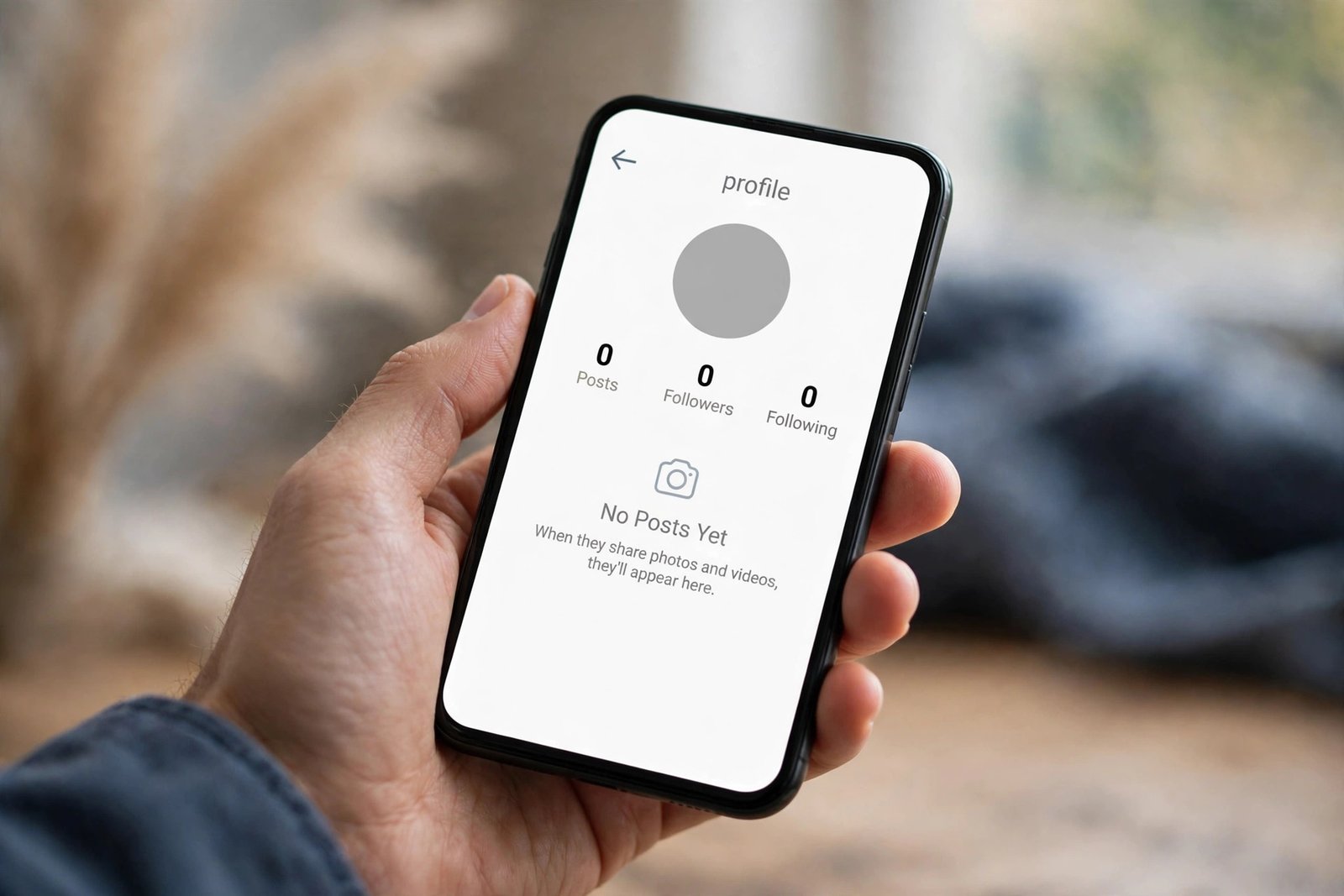
Sign 2: Their profile shows “No Posts Yet” with zero followers and zero following
If you can still reach their profile through an old link, a tagged photo or a saved post, read the screen carefully. A blocked profile commonly shows the username at the top, a blank profile picture or the default grey circle, “No Posts Yet” in the middle, and zero posts, zero followers and zero following. A direct link in a browser can also return “Sorry, this page isn’t available” or a “User not found” screen.
That empty profile is the single most recognisable sign of a block, because it contradicts what you know. You remember their 400 posts and their photo. Instagram is now showing you a shell. The shell exists because the app hides their content from your account specifically while keeping the profile address itself alive.
But the same empty screen appears when an account has been deleted, and a deactivated account can look similar. The difference is scope. A block hides the profile from you alone. A deleted or deactivated account hides it from everyone. That is why the comparison check at sign 7 matters more than any single screen.
Sign 3: Your old DM thread is still there, but you cannot send a message
Open your Direct inbox and find your old conversation with them. Instagram is precise about this one. Its help page says that after a block, your messaging threads will remain in your Direct inbox, but you will not be able to message them. In practice the thread stays put with the old messages intact, yet anything new you type either fails to send or sits there with no delivery, and Instagram states plainly that messages sent while blocked are not received and will not be delivered later even if you are unblocked.
This is a useful sign because it behaves differently from the other explanations. If someone deactivated their account, your thread usually shows their name replaced with “Instagram user” and the conversation looks closed off. If they simply stopped replying, your messages would still show as sent. A thread that exists, keeps its history, and refuses every new message is behaving exactly the way Instagram describes a blocked conversation.
Do not read too much into a single unanswered message, though. Silence has many causes. The sign is the combination: an intact thread plus messages that cannot be delivered at all.
Sign 4: You have vanished from each other’s follower lists
Blocking ends the follow in both directions. If you were following them, that follow is gone. If they were following you, that follow is gone too. Unblocking does not restore either one, so both of you would have to follow each other again.
You cannot check their following list directly once you are blocked, because you cannot open their profile. But you can check your own. Open your profile, tap Followers, and search for their name. If they followed you and their name is gone from your followers, and you know you did not remove them, that is a real piece of evidence.
A mutual friend can complete the picture from the other side. Ask someone who follows both of you to open the person’s following list and look for your name. If you are missing there too, the follow relationship has ended. That rules out a glitch or a search problem, because a follow does not end by itself.
Sign 5: Your likes and comments on their posts have disappeared
This one takes a little digging, but it is one of the strongest signs because Instagram describes it as permanent. When someone blocks you, your likes and comments are removed from their posts. If they unblock you later, those likes and comments do not come back.
Think back to a post of theirs you commented on, ideally a recent one. Open it through a notification, a saved post, or a mutual friend’s liked posts. If your comment is gone and you did not delete it yourself, that fits a block. The same applies to your likes on their older posts.
The reason this sign carries weight is that deactivation does not do this in the same way. A deactivated account hides everything, including the post itself, so there is nothing to check your comment against. A block leaves the post visible to everyone else while quietly removing your traces from it. Ask a mutual friend to open the same post. If your comment is missing for you but the post is alive and well for them, you have your answer taking shape.
Sign 6: You cannot tag or mention them anymore
Try to mention their username in a comment or a story, or tag them in a photo. Instagram says a blocked person cannot mention or tag the person who blocked them. The username either will not appear in the suggestions as you type, or the tag will fail.
On its own this is a weak sign. Mentions fail for boring reasons: a typo, a username change, or the person turning off mentions from people they do not follow. But as a supporting check it is quick and it costs nothing. If search fails, the profile is empty, the DM thread is dead and the mention will not complete either, the pattern is becoming hard to explain any other way.
Sign 7: They show up fine from another account or a logged-out browser
This is the check that decides it, and it is the one most guides skip over. A block is scoped to the pair of accounts involved. The profile is invisible to you, and only to you. A deactivated, deleted or suspended account is invisible to everyone.
So look from a vantage point they have not blocked. Ask a friend to open the profile on their own account. Search the username in a private browser window with no account logged in, which works when the account is public. Or, if you have a second Instagram account they do not know about, search from there.
If the profile loads normally anywhere else while it errors for you, you were blocked. If it errors everywhere, the account itself is gone or renamed, and nobody blocked anybody. There is no ambiguity left once you have that comparison. One account sees a normal profile with posts and stories. The other sees nothing. That difference is the block.
A word of caution here. Do not create a new account for the purpose of contacting someone who blocked you. Using a second account to check whether a profile is visible is fine. Using it to message someone who has made it clear they do not want contact is not, and it can get the new account restricted as well. The check is for your own peace of mind, and it ends there.
Blocked, deactivated, deleted or restricted: how to tell them apart
Most wrong conclusions about blocking come from confusing it with three other states. They look similar from the outside, but they behave differently once you test them.
| State | Profile from your account | Profile from a friend’s account | Your old DM thread | Your comments on their posts |
|---|---|---|---|---|
| Blocked | Empty or “page isn’t available” | Normal, posts visible | Stays, cannot send | Removed |
| Deactivated | Gone or “user not found” | Gone for everyone | Name may show as “Instagram user” | Hidden with the account |
| Deleted | Gone or “user not found” | Gone for everyone | Name may show as “Instagram user” | Gone with the account |
| Restricted | Looks completely normal | Normal | Messages go to their requests, no read receipts | Hidden from everyone except you |

Restricted deserves a closer look because it fools more people than blocking does. When someone restricts you, nothing disappears. You still see their profile, posts and stories exactly as before. What changes is quieter: your new comments on their posts are visible only to you, and your messages land in a separate requests folder they may never open. You will not see when they have read anything. From your side, a restriction can feel like being ignored rather than being blocked, and that is the point. Instagram built restrict as a low-drama alternative to blocking, for people who want distance without a visible break.
Mute is different again and simpler. Muting only hides their posts and stories from your feed. It changes nothing about what they can see, and it leaves no trace on their side at all.
The practical rule is this. If the profile looks normal, you have not been blocked, whatever else feels wrong. If the profile is empty for you and normal for a friend, you have been blocked. If it is empty for everyone, the account is gone for another reason.
The 3-check method, in order
Running all seven signs takes a while, and most of them overlap. If you want a fast answer, these three checks in this order give it to you in under five minutes.
First, search their exact username from your account and tap through to the profile if it appears. Note what you see: nothing, an empty profile, or a normal profile. Second, open your old DM thread and try to send a short message. Note whether it delivers. Third, check the same profile from somewhere they have not blocked, a friend’s account or a logged-out browser, and compare.
If the profile is missing for you, the message will not send, and the profile is alive elsewhere, you have been blocked. If the profile is missing everywhere, the account was deactivated, deleted, suspended or renamed. If the profile looks normal and messages send, you have not been blocked, and the most likely explanation is that they are simply not replying.
Each check rules out a different explanation, which is why the order matters. Search alone could mean a typo. The DM thread alone could mean a connection problem. The comparison alone could mean a private account. Together they leave very little room for doubt.
The myths that waste your time
A whole industry exists to sell certainty about blocking, and almost all of it is fiction. The most common is the “who blocked me” app. No app, tracker or website can hand you a list of the accounts that blocked you. Instagram does not publish that information to anyone, including third-party apps, so any app claiming to do it is guessing from the same public signals you can check yourself, or worse, harvesting your login. I would not install one, and I would not pay for one.
Story viewer sites are a related trap. They promise to show you who viewed your stories or who blocked you, and they deliver a random list dressed up as data. Instagram does not share story viewer lists with outside services.
A third myth is that you can tell from your follower count dropping by one. You cannot. Follower counts move for dozens of reasons, including deactivations, spam removals and people simply unfollowing. One number changing tells you nothing about who did it.
And a quieter one: checking whether they still appear in your suggested friends or your “following” list. Instagram’s suggestions are driven by contacts, mutual follows and activity, and they are unreliable as a blocking test. Use the three checks above instead.
What to do if you were blocked
Finding out you were blocked is unpleasant, and the worst response is to try to force the connection back open. Do not create new accounts to message them, do not ask a string of mutual friends to pass messages, and do not post about it publicly. A block is someone setting a boundary. Respecting it costs you nothing and protects your own accounts, since repeated attempts to contact someone who blocked you can be reported as harassment.
If the relationship matters to you, the honest route is outside Instagram. A calm message on another platform, or a conversation in person if that is appropriate, gives both of you a chance to talk about what happened. Keep it short, do not demand an explanation, and accept that they may not want to reconnect. Some blocks are permanent, and that is their right.
If you were blocked by mistake, or after a misunderstanding, time helps more than persistence does. People unblock. Instagram does not send a notification when someone unblocks you either, so the only way you will know is that their profile quietly becomes visible again.
If you are on the other side of this and you blocked someone in anger, remember that the side effects are permanent in one direction. Your likes and comments on their posts will not come back when you unblock them, and the follow will not restore itself. For a cooling-off period, restrict or mute does the job without burning the connection. Blocking is the right tool when someone is harassing you or making you feel unsafe, and it is worth using decisively in that case. It is a poor tool for a temporary argument.
My honest take
Instagram’s silence about blocking is frustrating, but it is also honest in its own way. A block is not a verdict on you. People block for reasons that have little to do with the person being blocked: an argument, a clean break after a relationship ends, a stranger they do not want watching their stories, or simply a tidy-up of their follower list. I have seen all of those, and only the first one is really about you.
The method in this guide works because it respects how Instagram actually behaves. One empty profile means very little. A missing search result plus a dead DM thread plus a profile that loads perfectly for your friend means a great deal. Run the checks in order, accept the result, and move on. If you were blocked, the healthiest next step is not a workaround. It is to leave the boundary where it is and put your attention somewhere it is wanted.
If this helped you settle the question, the same approach works on WhatsApp, where the signs are different but the logic is identical. I wrote a companion guide to the signs that mean something on WhatsApp, and the two together cover the two apps where most people first notice someone has gone quiet.